

GEOS on the C64
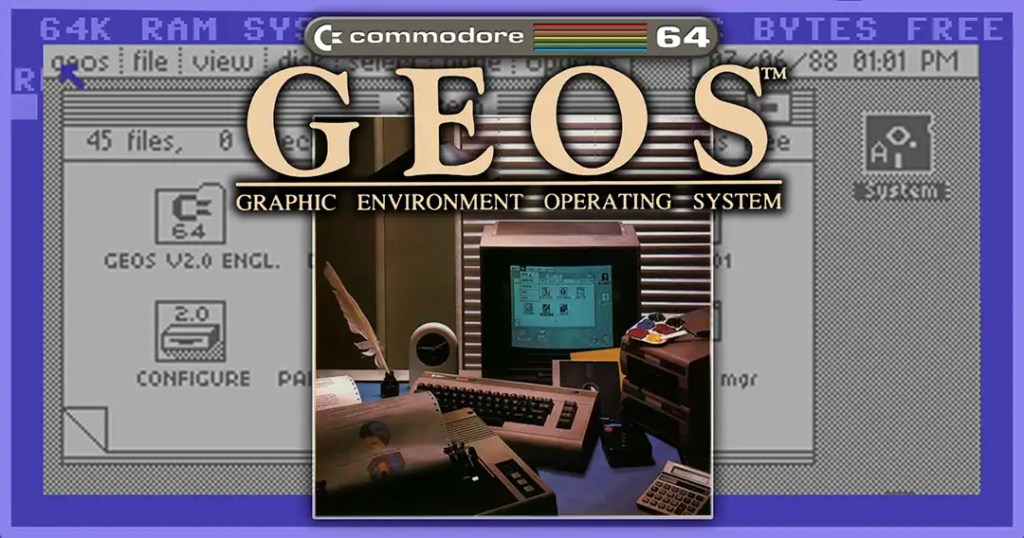
When GEOS was released for the Commodore 64 in 1986, it felt almost like a glimpse into the future. Instead of the usual BASIC screen, the system offered windows, icons, menus, and graphical control via joystick or mouse. The name stood for “Graphic Environment Operating System,” and that was precisely the big idea: to make the C64 usable not only as a gaming computer but also as a tool for text, graphics, and simple office tasks. While other home computers of the time were primarily operated via command lines, listings, and floppy disk commands, GEOS suddenly conveyed a sense of modernity that was typically associated with much more expensive computers. It was precisely this contrast that made the system so remarkable: Under the hood, it was still a classic 8-bit computer, but on the screen appeared an interface that looked surprisingly contemporary. For many users, GEOS was their very first encounter with a graphical user interface, and that is precisely why the system remains particularly vivid in the memories of many to this day.
History
GEOS was developed by Berkeley Softworks, led by founder Brian Dougherty. The company began working on a graphical interface in 1985 to extend the lifespan of the C64, which was already considered technically obsolete in the shadow of IBM PCs and Macintosh computers. At a time when graphical user interfaces were still perceived as modern and almost luxurious, the idea of implementing something comparable on an inexpensive home computer seemed particularly bold. That is precisely what made the project extraordinary from the start: GEOS was not only intended to deliver new software, but to give the C64 a completely new way of operating.
GEOS was released for the Commodore 64 in 1986; followed by versions for the C128 and later the Apple II. It is precisely this origin that is crucial: GEOS was not intended as a technical luxury, but as an attempt to squeeze an astonishing amount out of existing 8-bit hardware. In this way, the system also embodied a certain attitude of the 1980s: computers should not be replaced immediately, but could be given new capabilities through clever software. GEOS was thus not just a product, but also proof of how much software could change the perception of an already familiar computer.
Technically, this was remarkable. GEOS ran on a computer with 64 KB of RAM and a 1 MHz CPU, yet it already supported mouse operation, RAM expansions, and on the C64 even a built-in disk accelerator called diskTurbo. This was remarkable because the C64 had never originally been designed for such a complex graphical user interface. Window display, menu navigation, file management, and program control therefore had to be implemented in a very limited space and under extremely constrained hardware conditions. The fact that this succeeded smoothly enough for practical use was, in itself, a significant achievement.
Furthermore, GEOS used floppy disks as swap space or virtual memory expansion—something highly unusual on a home computer of this class. It was precisely this feature that allowed the system to offer functions one would typically expect from more powerful computers. At the same time, however, this also revealed the downside of the concept: Many of GEOS’s capabilities were impressive, but they required patience from the user because reloading data and programs took time. Precisely for this reason, GEOS is still considered one of the most impressive software achievements in C64 history: not because it operated under ideal conditions, but because it enabled an astonishingly modern user experience on very limited hardware.
Included Software
The actual GEOS package primarily included deskTop as a graphical user interface, geoPaint as a drawing program, geoWrite as a word processor, and various Desk Accessories—small utility programs for everyday use. The German manual specifically lists these components as the core of the software package. In addition, there were tools such as geoBoot, Configure, Notepad, geoDex, a calculator, and drivers for input and output devices.
The interaction between the applications was particularly interesting. GEOS already allowed users to cut, copy, and paste text and graphic fragments between programs. geoWrite was a WYSIWYG text editor with bitmap fonts, geoPaint was a painting and graphics program, and the Desk Accessories included small utilities such as a clock, notepad, calculator, and photo and text albums. Later, this grew into an entire ecosystem with programs such as geoCalc, geoFile, geoPublish, and geoSpell, which pushed the C64 toward word processing, data management, and desktop publishing.
deskTop was the actual control center of GEOS. Here, the user managed floppy disks, files, drives, and accessory programs. With its icons, menus, and windows, deskTop looked significantly more modern than anything else one was used to seeing on the C64, even if working on a single-disk system often remained somewhat cumbersome.
geoWrite was the package’s word processor and one of the most important programs of all. Texts could be displayed exactly as they would later appear when printed. This was very appealing for letters, invitations, or short articles, even though longer documents quickly reached their limits due to limited memory and a rather slow processing speed.
geoPaint was GEOS’s painting and drawing program. It offered tools for lines, shapes, freehand drawings, patterned areas, and minor corrections. Especially when used with a mouse, it allowed for surprisingly comfortable work by C64 standards, which is why geoPaint was often considered one of the system’s most impressive programs.
Desk Accessories supplemented the main programs with small everyday tools. These included, for example, a notepad, a calculator, a clock, or small collections for text and images. Such accessory programs made GEOS significantly more practical for everyday use because they were quickly accessible and could be used without having to switch programs.
geoDex was a simple address and contact manager. The program resembled an electronic card index and was ideal for clearly storing phone numbers, addresses, or short notes about people. It was a particularly useful addition for personal use or small office tasks.
geoCalc brought spreadsheet functionality to the C64. It allowed users to organize numbers into tables, perform simple calculations, and create small overviews. While the C64’s hardware was naturally insufficient for large or complex tasks, geoCalc was quite remarkable for home and small-office applications.
geoFile was designed for structured data collections and essentially functioned like a small database. Users could create, sort, and search through data records for specific content. While such programs were not commonplace on home computers, they made GEOS significantly more appealing for more serious applications.
geoPublish was geared more toward layout and desktop publishing. The program helped arrange text and graphics on a page and make them more visually appealing. With this, GEOS ventured somewhat into the realm of small typesetting and layout systems, which seemed particularly ambitious on an 8-bit computer.
geoSpell added spell-checking to the word processor. Especially in combination with geoWrite, this was a step toward serious office software. Even if the capabilities weren’t comparable to later PC solutions, it demonstrated just how comprehensively the GEOS ecosystem had been conceived.
Commodore Mouse
The Commodore Mouse wasn’t strictly necessary for GEOS, but in practice it was nearly indispensable for many users. While the system could also be operated with a joystick, it quickly became apparent—especially with a graphical user interface—that a mouse was much better suited for windows, icons, menus, and selection tools. This brought GEOS on the C64 a good deal closer in its operating logic to systems like the Macintosh or early graphical PC interfaces.
Its greatest advantage lay in the significantly more precise control of the mouse pointer. This was particularly noticeable in deskTop when clicking on files, managing disk contents, or opening menus. This advantage was even more pronounced in geoPaint, where lines, shapes, and smaller drawing tasks could be executed much more naturally and accurately with a mouse than with a digital joystick. The user experience in geoWrite also benefited from this, as text areas, functions, and page elements could be selected more easily.
Another plus was the overall more modern feel of the user experience. With the Commodore mouse, GEOS no longer seemed like just an interesting experiment, but actually like a small graphical work environment. Users could operate programs more directly, had to “navigate” less awkwardly via the joystick, and thus experienced the C64 as surprisingly advanced. The mouse was therefore an important accessory, especially for demonstrations or making a first impression.
However, the Commodore mouse also had clear drawbacks. It had to be purchased separately and made the already not-exactly-cheap GEOS experience even more expensive. Not every C64 owner was willing to buy additional hardware just for a graphical interface. On top of that, while the mouse improved usability, it did nothing to change the system’s fundamental technical limitations: The C64 remained a computer with little memory, slow mass storage, and limited processing power. This meant that, despite the mouse, GEOS often felt sluggish, contrary to what its elegant interface initially suggested.
There was also a practical drawback in everyday use: Those who owned only a floppy disk drive still had to frequently swap disks, reload programs, and put up with waiting times. So while the mouse made GEOS more comfortable and significantly more precise, it could not overcome the structural limitations of the hardware. This was precisely where its special role lay: It was no miracle cure, but it was what finally turned GEOS into the input environment the system was actually intended to be.
Trivia
GEOS is full of little quirks that seem almost bizarre today. First: Despite its modern interface, it wasn’t started “like an operating system,” but quite down-to-earth from the BASIC prompt with LOAD “*”,8,1. This serves as a reminder that beneath the sleek interface, a classic C64 was still at work, whose daily routine was actually defined by BASIC commands, floppy disk access, and direct drive communication. It is precisely this contrast between the modern interface and the traditional startup process that contributes to part of GEOS’s special appeal.
Second: For the system kernel, Berkeley deliberately adopted the Commodore spelling “kernal” instead of the usual “kernel.” This small quirk seems insignificant at first glance, but it is typical of the close alignment with the Commodore world. GEOS did not want to be a completely foreign system, but rather a modern add-on system built upon the familiar foundation of the C64.
Third: The official manual even touted that GEOS opened up the world of mouse control, icons, windows, and menus “with a simple click of the joystick”—which already shows how much the system straddled the old and new computer worlds. On the one hand, GEOS was clearly oriented toward modern graphical user interfaces; on the other hand, it had to take into account the reality of many C64 households, where mouse peripherals simply weren’t available. This is precisely what gave rise to a peculiar blend of promises of the future and pragmatic improvisation.
Added to this is the fact that, in everyday use, GEOS often felt almost like a small cultural shift. Those who had previously mainly loaded games or typed out BASIC programs suddenly saw folder icons, menus, desktop metaphors, and documents that were treated like work materials. To today’s users, this may sound obvious, but on a home computer from the mid-1980s, this impression was remarkable and, for many, even a bit spectacular.
Another famous feature was the copy protection. GEOS boot disks had to be booted from the original and were considered extremely sensitive. Later analyses by the community describe them as notoriously fragile; apparently, this is why the package even included a second “backup” boot disk. This is a fine example of how ambitious software on the C64 was not only elegant but sometimes also surprisingly fragile.
It was precisely this copy protection that contributed greatly to the myth of GEOS. On the one hand, it was meant to protect the software; on the other, it made the system more vulnerable in everyday use and, for some users, more frustrating. If a boot disk was damaged, it wasn’t just a single program that was affected, but access to the entire graphical environment. Thus, this seemingly minor point illustrates very well how closely progress and practical problems were intertwined in GEOS.
Contemporary Reviews
Contemporary reviews were mixed. Many testers were initially impressed that a C64 could even display a graphical user interface with windows, menus, and utility programs. The mere fact that a home computer of this class suddenly resembled a small office computer drew attention. GEOS was therefore often described as technically astonishing and almost bewildering, because it offered something one would typically expect from significantly more expensive systems.
In contemporary reviews, geoPaint was generally viewed positively: The program already offered the usual drawing functions such as brushes, lines, shapes, fill patterns, and an undo function. This made it unusually versatile for a C64 program and clearly demonstrated the potential of the GEOS graphical interface. At the same time, however, critics noted that operation via the joystick was its biggest weakness; for graphic work in particular, it was a highly unsuitable input device. Many testers therefore felt that GEOS actually needed a mouse for truly comfortable use.
geoWrite was viewed with even greater skepticism. While the program was considered usable for letters, posters, and simple layouts, it was not necessarily suitable for long, serious writing tasks. The system’s limitations became particularly apparent with longer texts: working could become tedious, reloading data took time, and the C64’s limited resources were clearly noticeable in everyday use. What seemed like a minor revolution at first glance often proved to be quite exhausting during longer sessions.
Added to this was the fact that many reviews at the time evaluated not only the programs themselves but the entire working environment. A second floppy drive, a mouse, or additional memory expansions made GEOS much more pleasant to use, but these were not part of every user’s standard setup. This created the impression that GEOS could often only truly showcase its strengths when additional hardware was available. On a C64 with only basic equipment, however, everyday use was frequently marked by loading times, disk changes, and minor operational hurdles.
Overall, the GEOS package therefore struck many testers as a mix of technical fascination and practical compromises: visionary, yet at the same time slow, sometimes inflexible, and heavily dependent on additional hardware like a mouse and a second drive for everyday use. That was precisely the dilemma: GEOS was ahead of its time, but on a standard C64 it was often closer to an impressive proof of concept than to completely seamless productivity. It is precisely this tension between enthusiasm and disillusionment that makes the reception at the time so interesting even today.
Legacy
Despite these weaknesses, GEOS’s legacy is enormous. It demonstrated that a C64 could be far more than just a gaming computer and helped reimagine the machine in a more productive direction. This is precisely where its historical significance lies: GEOS did not change the hardware itself, but it did change the perspective on what was actually possible with that hardware. A computer that was primarily associated with games, BASIC, and home use could suddenly also appear as a work tool, a word processing system, and a graphical platform.
Commodore marketed GEOS alongside later C64 models, and for many users, the system was their first encounter with graphical computing on 8-bit hardware. For some, GEOS was even their first direct encounter with a mouse, with windows, or with the idea of opening documents and programs via icons rather than commands. In this way, GEOS had not only a technical but also a cultural impact: it fostered a new understanding of how computers could be operated.
Even beyond its immediate use, GEOS left a lasting impression. The system proved that intelligent software development could elicit surprisingly modern capabilities even from severely limited hardware. In retrospect, GEOS is therefore often viewed less as a practical everyday tool and more as an extraordinary feat of engineering. This achievement was particularly impressive on the C64, whose limitations were actually very clearly defined.
To this day, GEOS lives on in the retro community. There are reverse-engineered versions, community projects, and extensions such as gateWay or Wheels. Such projects demonstrate that GEOS has never completely faded from the collective memory of the C64 scene. Instead, it has remained a system that is continually re-examined, improved, and adapted to modern storage or emulator solutions.
This shows that GEOS is not a forgotten curiosity, but a system that, decades later, is still being technically examined, maintained, and further developed. Its true legacy therefore lies not only in the programs of that era themselves, but also in the idea that even a seemingly fixed home computer can be reinvented through good software.
Conclusion
GEOS for the C64 was a contradiction in the best sense: on the one hand slow, hardware-hungry, and often inconvenient in everyday use; on the other hand visionary, elegant, and far ahead of its platform. It brought graphical user interfaces, WYSIWYG word processing, and a small software ecosystem to an 8-bit home computer that originally came from a completely different computing world. In doing so, GEOS impressively demonstrated that technical boundaries do not always have to be pushed solely by new hardware, but also by clever software concepts. It is precisely this idea that makes the system so remarkable to this day.
Furthermore, GEOS is not only interesting as a product, but also as a symbol of an entire phase of computer history. It represents an attempt to get more out of existing technology than many would have ever thought possible. While modern graphical interfaces on powerful hardware seem like a given, GEOS had to implement many of these ideas under conditions that, from today’s perspective, seem extremely limited. This is precisely why, in retrospect, the system is often perceived not only as a useful tool but also as an exceptional creative achievement.
This is precisely why GEOS is so fascinating today: not because it was perfect, but because it made possible on limited hardware something that actually seemed impossible there. Its enduring appeal lies in this blend of practical imperfection and technical audacity. GEOS may never have been the most convenient way to work with a C64, but it was one of the most impressive.








 McHenry's Lair
Kommentar verfassen :