


Since many people claim that creating artwork with A.I. is extremely easy and fast, I would like to show in detail how much effort is really involved in creating an advertising flyer with A.I.
Background
My wife runs an Etsy shop [LINK] where she sells her self-designed, unusual, one-of-a-kind jewellery. Jewellery that stands out for its individuality and special charm. For promotional campaigns such as Black Friday, Xmas, Valentine’s Day and other shopping events, she needed appealing and effective advertising flyers for platforms such as Facebook, Instagram and X. In the past, we often relied on using homemade photos of jewellery being put on. But this year, we wanted to create something truly special that would attract more attention – especially in today’s highly competitive online world, where it is increasingly difficult to stand out.
After much deliberation, an idea took shape: an image showing a gothic-style girl leaning happily over a small (jewellery) gift, accompanied by an original and memorable saying.
But implementing this idea posed a challenge. How should we create such an image? A photo shoot of our own was not an option, because the model search, location planning, appointments and usage rights would have been too time-consuming and costly. Stock photos were also out of the question – the search for a suitable image is time-consuming, expensive and often associated with restrictive rights.
This is when we came up with the idea of using generative A.I. for image design.
But instead of relying on just one tool, I developed a structured workflow that combines various specialised A.I. tools. The goal was to create several unique, high-quality sales flyers with as little effort as possible during the Black Friday weeks. Here is the workflow that consists of several different A.I. tools and makes optimal use of their strengths:
1. GROK – Photorealistic Image Generation
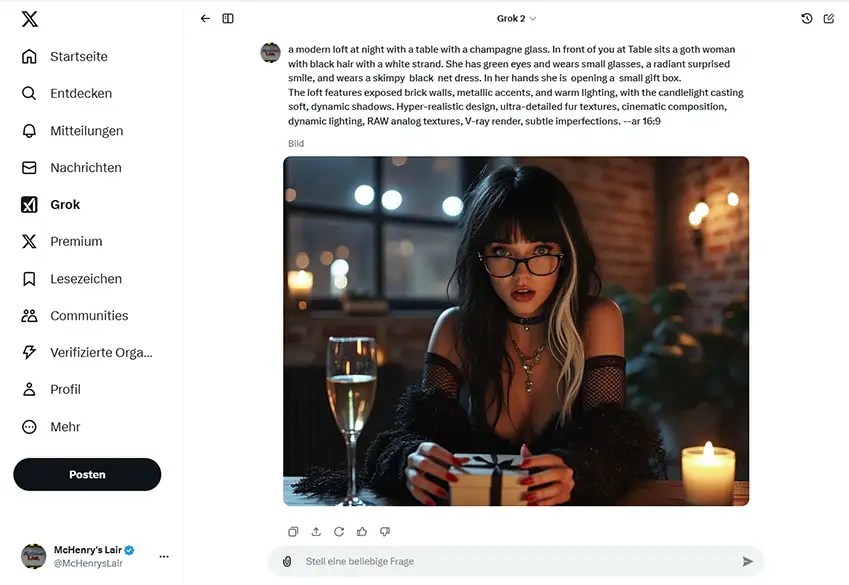
The first step was image generation. After testing various tools such as DALL-E and Local-MidJourney, I decided on GROK. While DALL-E is better at interpreting complex prompts and creating artistic images, GROK is characterised by its ability to generate particularly realistic images. Another advantage of GROK is its less restrictive content filter, which is helpful for creative projects. Although GROK occasionally has difficulty implementing prompts exactly, overall it provided the best results for our project.
a modern loft at night with a table with a champagne glass. In front of you at Table sits a goth woman with black hair with a white strand. She has green eyes and wears small glasses, a radiant surprised smile, and wears a skimpy black net dress. In her hands she is opening a small gift box.
The loft features exposed brick walls, metallic accents, and warm lighting, with the candlelight casting soft, dynamic shadows. Hyper-realistic design, ultra-detailed fur textures, cinematic composition, dynamic lighting, RAW analog textures, V-ray render, subtle imperfections. –ar 16:9

Supplement:
With GROK’s latest version for generative A.I., Aurora, unfortunately the quality of the images has deteriorated significantly. Many of my prompts that previously delivered outstanding results hardly work anymore. Even after adjustments, the results unfortunately fall far short of expectations.
It seems as if the basic functioning of the interpreter has changed drastically. Detailed documentation or targeted improvements to the tool are urgently needed to make GROK/Aurora effective again. It would be helpful to be able to better understand the changes and new possibilities so that use can become productive and inspiring again.

2. Topaz Gigapixel AI – Upscaling
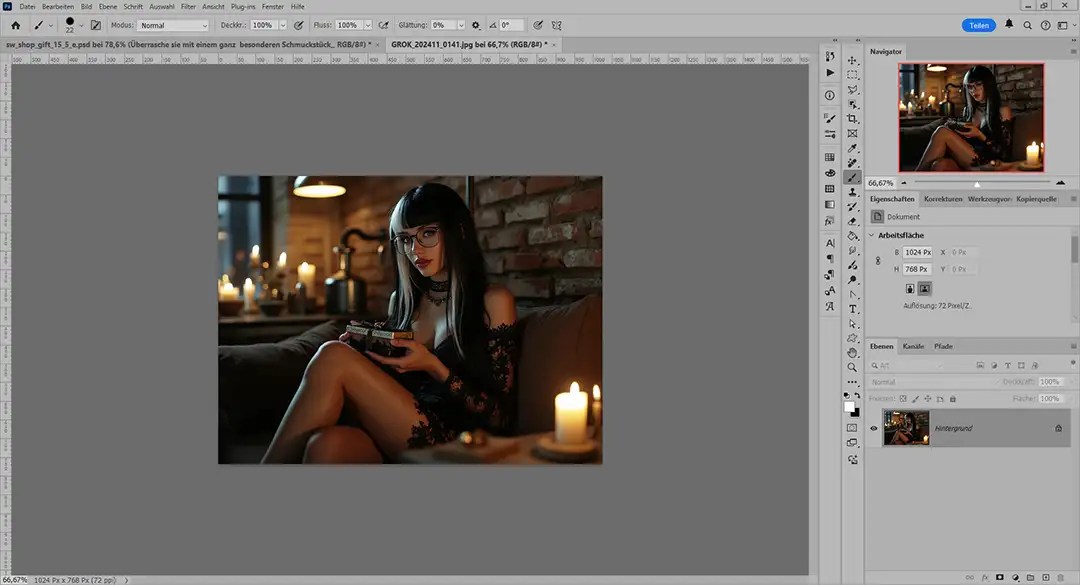
Since the images generated by GROK are only available in a resolution of 1024×768, I used Topaz Gigapixel AI to scale the images to 1365×1024. This powerful tool makes it possible to maintain image quality despite the magnification. Compared to other upscaling or standard Photoshop tools, Topaz Gigapixel AI stands out for its advanced processing and attention to detail. With this output size, I had a solid basis for further editing and adjusting the images.
3. Photoshop Generative Expand
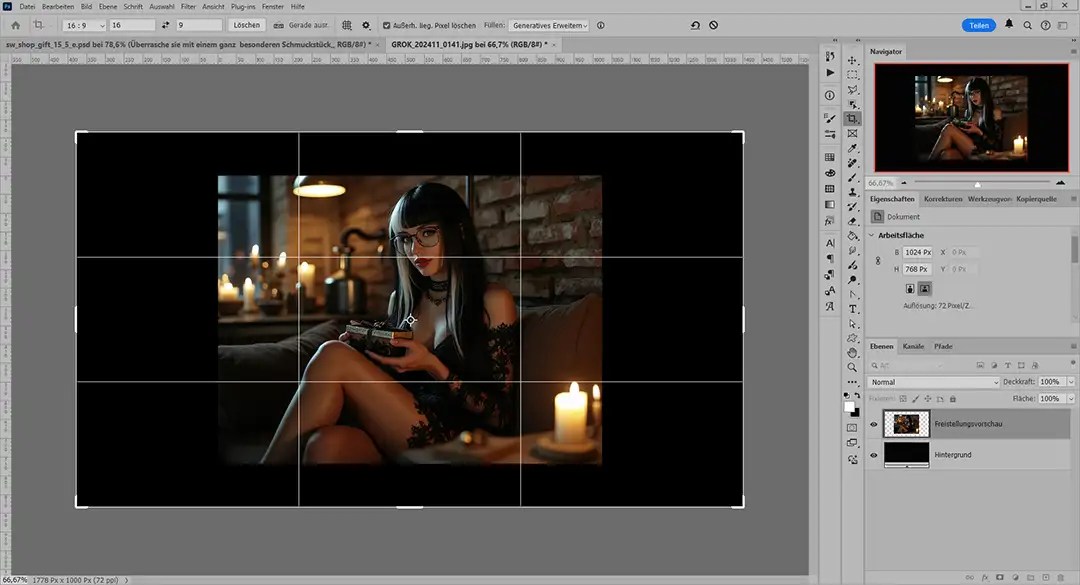
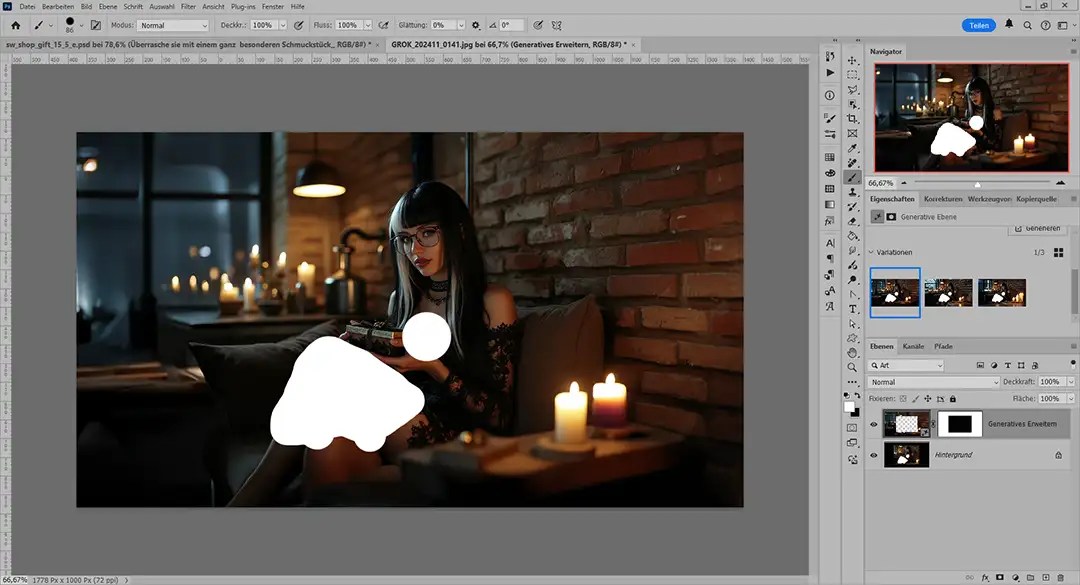
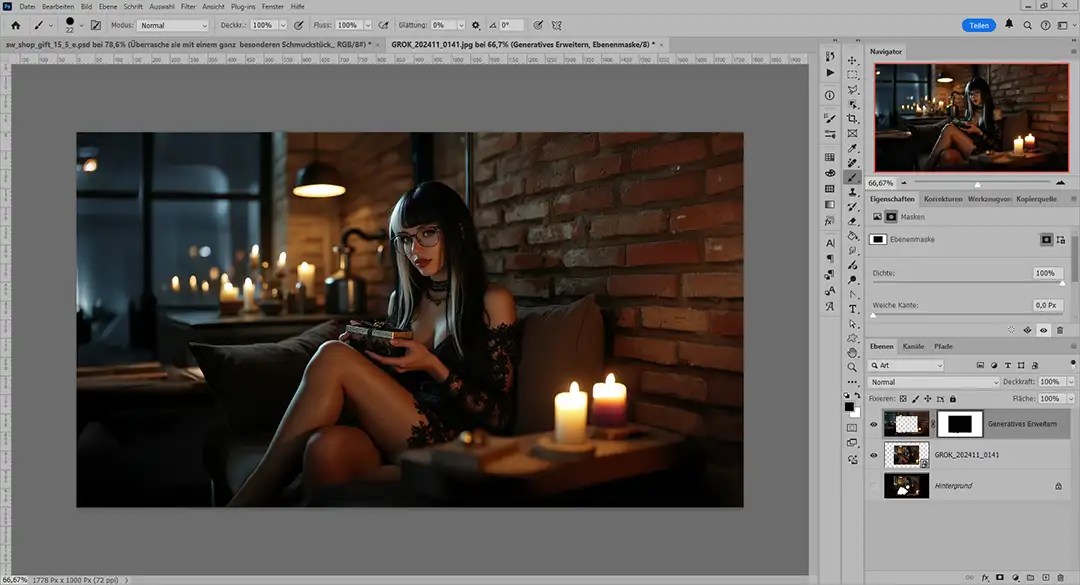
GROK generates images in a 3:4 format by default. However, a 16:9 format is optimal for my purposes, as it is better suited for both social media platforms and advertising banners. This is where Photoshop’s Generative Expand (Firefly) came into play. Using this feature, I expanded the image area horizontally and vertically to 2133×1200. Firefly offers the option of generating multiple variants, so I was able to select the one that best suited my vision. An added benefit of this expansion was that I was able to increase the angle of the image to make the subject more appealing and dynamic. By adding more background and context, the image had more depth and told a more compelling story. One obstacle, however, was Firefly’s strict content filter, which occasionally caused me to have to manually ‘black out’ certain areas in the image beforehand and restore them after enhancement.
4. Luminar Neo – image processing
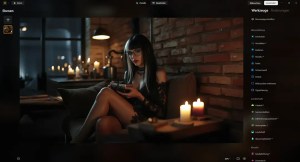
The next step was to fine-tune the generated image. For this, I used Luminar Neo, a versatile image editing tool. I made classic adjustments such as exposure, white balance, sharpness and colour saturation. At the same time, I used effects such as fog, light rays and bokeh to enhance the atmosphere of the image. Luminar Neo offers a wide range of filters and effects, but I had to be careful not to overuse them in order to preserve the natural effect of the image.
5. ChatGPT – slogan creation
Now that the image has been prepared, the next step is to find a suitable idea for the advertising slogan / text design. I uploaded the image to ChatGPT and asked questions like: ‘Show me advertising slogans that go with this image. Topic: Surprise your dark sweetheart with handmade goth / alternative unique jewellery.’ ChatGPT then generated ten suggestions, which I analysed and partially combined to find the best slogan. If none of the suggestions was optimal, I repeated the process until I had a result that was a perfect fit.
6. DeepL Write – text refinement
To further optimise the advertising slogan that had been found, I used DeepL Write. This tool allows you to create texts in different styles, e.g. enthusiastic, diplomatic or relaxed. I tried out several style options to ensure that the slogan was emotionally appealing and concise in terms of content. In addition, thanks to the text analysis options provided by DeepL Write, I was able to significantly improve the readability and linguistic elegance of the slogan.
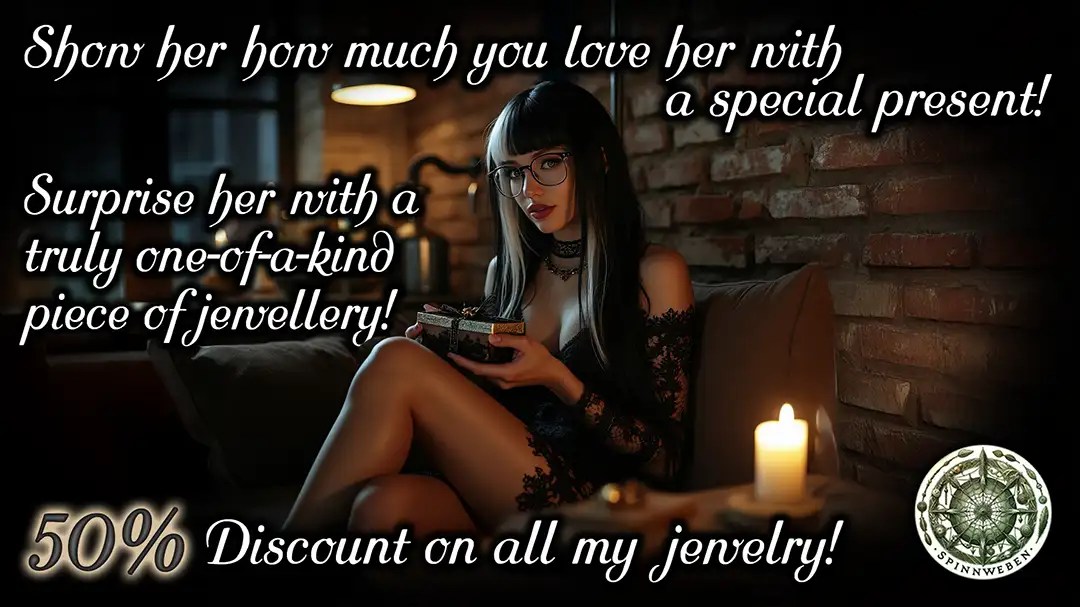
The refined text was then inserted into the image. In doing so, I paid attention not only to an appealing font, but also to details such as colour contrasts and text alignment to maximise readability. In addition, I adjusted the positioning dynamically to integrate the text perfectly into the overall visual concept of the flyer. This careful placement was essential to ensuring that the overall effect of the flyer was convincing both visually and in terms of content.
Finalisation in Photoshop

Finally, I saved the finished image in full resolution in Photoshop format, which allows it to be flexibly adapted for future projects. This high-resolution version makes it possible to make further adjustments if needed or to optimise the design for different platforms. For publication on the web, I reduced the resolution to 1920×1080 because this format is both high quality and data-friendly. The image was finally saved as a 70% JPEG to ensure fast loading time while maintaining the visual integrity of the flyer.
Optional steps
- DeepL Translate: To appeal to international audiences, I translated the advertising slogan into English using DeepL Translate. The English version was integrated into the image as an additional layer. In addition, I checked the linguistic nuance to ensure that the slogan would also resonate culturally and emotionally with the target audience. If necessary, I further adapted the text to align it with the expectations of an international audience.
- ChatGPT (again): Before the final publication, I used ChatGPT to create suitable image descriptions and hashtags. These complement the advertising efforts and increase the flyer’s reach. Furthermore, I used ChatGPT to generate alternative text suggestions to post varying content on different platforms and thus better address the target audience. These strategies helped to maximise the flyer’s visibility and efficiently reach different target groups.
Finished
Summary
This example illustrates how efficiently and creatively A.I. tools can be used in combination. A well-thought-out workflow that combines the strengths of different tools can save an enormous amount of time without compromising on quality
Thanks to this sophisticated workflow, I was able to create two unique and high-quality flyers every day during the Black Friday weeks. Although the initial effort was considerable – especially in developing and optimising the prompts and refining the basic layout – this investment paid off Once the foundation was in place, the time needed to create each flyer was reduced to less than 20 minutes. This structured approach made it possible to combine efficiency and creativity while maintaining consistently high quality.
Is creating art with A.I. really as easy as it is often made out to be The answer is: yes and no. Efficiency and results depend heavily on your own requirements and working methods. While A.I. tools can significantly facilitate and accelerate creative processes, they do not replace the need to develop innovative ideas and implement them wisely. Without a clear vision and careful post-processing, the content that is generated is often generic and not very appealing, and it does not achieve the desired effect
However, if you are willing to invest time and effort in working with A.I., you can achieve impressive results. It is crucial to use the strengths of the tools in a targeted manner and not to lose sight of the creative process. The combination of technical expertise, artistic vision and strategic use of A.I. tools creates the basis for works that are not only technically brilliant but also emotionally and visually convincing.
Keywords: AI promotional flyer design, AI workflow tools, Gothic style marketing, Etsy shop promotion, AI image editing, AI content creation tools, generative AI for business, Photoshop AI enhancements, jewelry marketing tips, AI-powered marketing, flyer design tips, generative AI techniques, AI art process, digital marketing strategies, Etsy business tools, shop flyer ideas, Gothic aesthetic advertising, AI in small business, AI-powered creativity, handcrafted jewelry marketing, visual content marketing, AI-enhanced visuals, e-commerce branding tips, artistic flyer creation,
Hashtags: #AIWorkflow #EtsyMarketing #GothicStyle #AIDesignTools #AIArt #ShopPromotion #EtsyJewelry #AIImageEditing #CreativeMarketing #DigitalTools #AIMarketingTools #FlyerDesign #GenerativeAI #EtsyShopOwners #HandcraftedJewelry #GothicAesthetic #CreativeFlyerDesign #SmallBusinessAI #VisualMarketing #ECommerceBranding #AIArtProcess #DigitalCrafting #AIEnhancements #ShopFlyerDesign #MarketingInnovation





 McHenry's Lair
Kommentar verfassen :